If you’ve been doing Python web development for any amount of time, you’ve probably encountered the term WSGI. You might know that it relates somehow to the way Python websites are served. But what exactly is it, and why should you care?
The Dark Ages
In the early 2000s, Python was already gaining traction as a language for web development. At this time, every framework developer had a question in front of them – how will my framework handle incoming HTTP requests? This led to a lot of fragmentation in the Python ecosystem. With every framework using their own slightly different approach, you were often limited to a small set of web servers by your framework.
In contrast to this, Java had already solved a similar problem with the Java Servlet specification in the late 1990s. Their approach allowed Java web framework developers to implement a single standardized interface that could be consumed by any web server using the Java platform.
Looking back at Python, a relatively new kid on the web, there was no concept
of such a standard. Some web frameworks employed web servers written in Python,
some embedded Python interpreter into the web server itself (mod_python in Apache),
while others invoked Python using some gateway protocol like CGI or FastCGI.
This segmentation led to a new standard called the Web Server Gateway Interface, or WSGI, in 2003. Before we dive deep into WSGI, let’s take a look at one of the more common ways Python was used for web development in the early days - CGI.
Common Gateway Interface
The history of CGI dates back to the early 1990s, when the team at the National Center for Supercomputing Applications came up with the idea of “Server Scripts”.
The idea was that while websites until that point were used to serve static files from a file system, you could have a program process the request and produce some kind of dynamic response. The primary use case for such system was the handling of HTML forms.
While the original idea primarily targeted programs written in C, the overall interface was designed to be very simple and, at the same time, pretty universal. The whole idea was pretty simple: when a server receives a request to the CGI script, it will spawn an instance of that script, provide it with any required data, wait for it to produce a response and send that to the client.
The script received HTTP headers and some additional data in the form of environment variables and received any request body on stdin. The program should output HTTP headers and response body on its stdout.
TL;DR of The CGI Specification
When an HTTP request hits the web server, the CGI script will receive the following environment variables:
SERVER_SOFTWARE: name and version of the server softwareSERVER_NAME: hostname of the serverGATEWAY_INTERFACE: version of the CGI specification the server supportsSERVER_PROTOCOL: the name and revision of the protocol this request came inSERVER_PORT: the port number to which the request was sentREQUEST_METHOD: the HTTP method with which the request was madePATH_INFO: extra URL path information, usually the part after CGI script’s namePATH_TRANSLATED: a translated version of PATH_INFO, with any mapping appliedSCRIPT_NAME: a virtual path to the script being executed, used for self-referencing URLsQUERY_STRING: the information which follows the?in the URL which referenced this scriptREMOTE_HOST: the hostname making the request (if available)REMOTE_ADDR: the IP address of the remote host making the requestAUTH_TYPE: if the server supports user authentication and the script is protected, the protocol-specific authentication methodREMOTE_USER: if the server supports user authentication and the script is protected, the authenticated usernameREMOTE_IDENT: if the HTTP server supports RFC 931 identification, the remote user name retrieved from the serverCONTENT_TYPE: for queries with attached information (e.g., HTTP POST and PUT), the content type of the dataCONTENT_LENGTH: the length of the content as given by the client
Additionally, any HTTP headers will be converted to environment variables. For example,
User-Agent becomes the HTTP_USER_AGENT environment variable.
We can see, that some of those names are still in use in various places. For example,
the Django framework has request.path_info, which corresponds to the PATH_INFO
CGI variable here. PHP also follows this with stuff like $_SERVER["REMOTE_ADDR"]. So if you
ever wondered why these things have such weird names, this is why.
The CGI script will also receive any associated request body on the stdin. In return, it is expected to return something that resembles an HTTP response on its stdout:
Content-type: text/plain

Here would be your request body.
Soon, people determined that they would need to return different HTTP status codes,
so a special header called Status was added for this reason. The CGI specification
also allowed you to return the whole HTTP response that would be sent to the client
as-is if your script name started with nph-.
PEP 333 to The Rescue
This is all great and all, but what does this have to do with WSGI? A lot, actually. When WSGI was first proposed, its goals were simple:
- Provide the Python ecosystem with a standard similar to Java Servlets
- Ensure ease of use for framework developers
- Provide the simplest implementation possible
So, their idea was: let the frameworks provide a simple method that the web server will call to get the response. With that, we got PEP 333 (and later PEP 3333 updated for Python 3).
def wsgi_handler(environ, start_response):
    ...
This method is called with two arguments. The first is a dictionary containing information about the request itself:
- a subset of CGI environment variables:
REQUEST_METHOD,SCRIPT_NAME,PATH_INFO,QUERY_STRING,CONTENT_TYPE,CONTENT_LENGTH,SERVER_NAME,SERVER_PORT,SERVER_PROTOCOLand anyHTTP_variables - new, WSGI defined variables:
wsgi.version: version of the WSGI specificationwsgi.url_scheme: scheme of the request (http/https)wsgi.input: file-like object with the request bodywsgi.errors: file-like object to which error output can be writtenwsgi.multithread:Trueif the handler can be called from another threadwsgi.multiprocess:Trueif the handler can be called from another processwsgi.run_once:Trueif the web server expects the handler to be called just once
- any other OS environment variables or web server provided custom data
Now, the second argument is more interesting. You receive a callable function that
is used to send response headers. The function looks something like this: start_response(status, response_headers, exc_info=None).
The arguments here are quite self-explanatory:
statusis a string representing the HTTP status line (200 OK)response_headersis a list of tuples(header, value)describing the response HTTP headersexc_infois an optional exception info, when calling from an error handler
This function returns another function that can be used to write to the response buffer, if needed by the application.
However, the intended way an application should return the response body is by either
returning a list of byte strings or yield-ing byte strings. These byte strings
will be sent right to the client.
Basic WSGI Application
So, with all the theory out of our way, let’s build a very basic WSGI application that returns hello world:
# wsgi.py
def hello(environ, start_response):
    start_response("200 OK", [("Content-Type", "text/plain")])
    return [b"Hello, world!"]
Let’s point a real WSGI server to our small application and test it out.
$ uvx gunicorn wsgi:hello
$ curl localhost:8000
Hello, world!
So, as we can see, our little application is alive and accepting requests!
Let’s Build a WSGI Server
Well, that was fun! Now, let’s step up the game a bit. What about a WSGI server? To be honest, I don’t really want to write a full-blown Python program that will parse HTTP requests (even though I am certain that an LLM would be capable of doing that).
So, we will do something else instead: write a small Python program that will act as a bridge between CGI and WSGI.
#!/usr/bin/env python3
import os
import sys
import io

from wsgi import hello

environ = dict(os.environ)
environ["wsgi.version"] = (1, 0)
environ["wsgi.url_scheme"] = "http"
environ["wsgi.input"] = sys.stdin
environ["wsgi.errors"] = io.BytesIO()
environ["wsgi.multithread"] = False
environ["wsgi.multiprocess"] = False
environ["wsgi.run_once"] = True


def start_response(status, headers, exc_info=None):
    headers.append(("Status", status))
    for header, val in headers:
        print(f"{header}: {val}")
    print()

    return sys.stdout.write


response = hello(environ, start_response)

for resp in response:
    print(resp.decode())
This is a very crude code omitting any kind of data validation, but for the purposes
of this experiment, it is good enough. I will use Caddy
server with aksdb/caddy-cgi/v2 plugin for CGI support with the following Caddyfile:
http://localhost:8000 {
  cgi / ./server.py
}
After starting the Caddy server and hitting our application, we really get a response!
$ curl localhost:8000
Hello, world!
Great, now let’s quickly change the hello method to a real WSGI application from
Django.
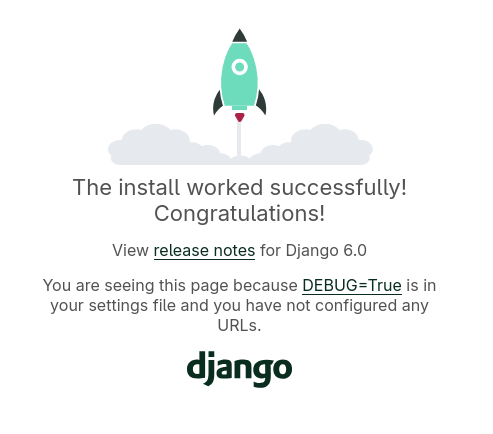
Django running behind a scrappy WSGI server.
It’s not fast nor secure by any stretch of the imagination, but it works and it’s mine!
WSGI in Production
Well, it goes without saying that this is not the way you should deploy your Python applications. Instead, you should reach for one of the battle-tested servers:
The future is async, so we also have something called ASGI (Asynchronous Server Gateway Interface), which extends WSGI to support asynchronous I/O and WebSockets.
Understanding WSGI gives you some important context for how Python web frameworks and servers have evolved and run under the hood. Besides, it’s still widely used today in many deployments.